My Computer Info
- Computer
Processor : AMD Ryzen 7 5800X3D 8-Core Processor
Memory : 16297MB
Machine Type : Desktop
Operating System : Pop!_OS 22.04 LTS
Motherboard : X570 Phantom Gaming-ITX/TB3 (ASRock) - Version
Kernel : Linux 6.9.3-76060903-generic (x86_64)
Version : #202405300957~1726766035~22.04~4092a0e SMP REEMPT_DYNAMIC Thu S
C Library : GNU C Library / (Ubuntu GLIBC 2.35-0ubuntu3.8) 2.35 - Display
Resolution : 5360x1440 pixels
OpenGL Renderer : NVIDIA GeForce RTX 2080/PCIe/SSE2 - Audio Devices
Audio Adapter : HDA-Intel - HDA NVidia
Audio Adapter : USB-Audio - HyperX QuadCast
Audio Adapter : HDA-Intel - HD-Audio Generic - Input Devices
HP, Inc HyperX QuadCast Consumer Control
SteelSeries SteelSeries Rival 500 Gaming Mouse
HD-Audio Generic Line Out CLFE
BDA NSW Fusion Pro Controller
Keychron K8 Keychron K8 - SCSI Disks
ATA ST4000DM004-2CV1
ATA Samsung SSD 850
ATA Samsung SSD 870
- Computer
This is a workaround for running Helldivers 2 on flatpak Steam version that has the fullscreen issue where you have to be in borderless or windowed mode in order for the game to start.
Find where the user_settings.config file is located for Helldivers 2 and copy to a user destination
In my case I put it in my user bin folder. You will have to replace <user> with your username
cp /home/<user>/.var/app/com.valvesoftware.Steam/.local/share/Steam/steamapps/compatdata/553850/pfx/drive_c/users/steamuser/AppData/Roaming/Arrowhead/Helldivers2/user_settings.config /home/<user>/bin/Make sure it has borderless_fullscreen set to true and fullscreen set to false in user_settings.config
audio_device = 2
audio_volume = 1
maximized_window = false
voice_chat_volume = 1
framerate_limit_enabled = false
fullscreen = false
music_volume = 0.13223141431808472
dialogue_volume = 1
aspect_ratio = -1
sfx_volume = 1
borderless_fullscreen = true
hostability = "000080c100009c3400000003000000065917fa5a"
prev_audio_device = 0
adapter_index = 0
enable_resource_lock_debug = true
version = 15
render_backend = 0
prefer_hdr = false
Have Flatseal change to add other files with destination of user config setting
Since I have steam installed as a flatpak. I also have Flatseal installed to add directory permission to my helldivers 2 scripts
sudo apt install flatsealUnder Filesystem in Other files add your directory that has your script and user_settings.config file. In my case its under “/home/andronicus/bin”
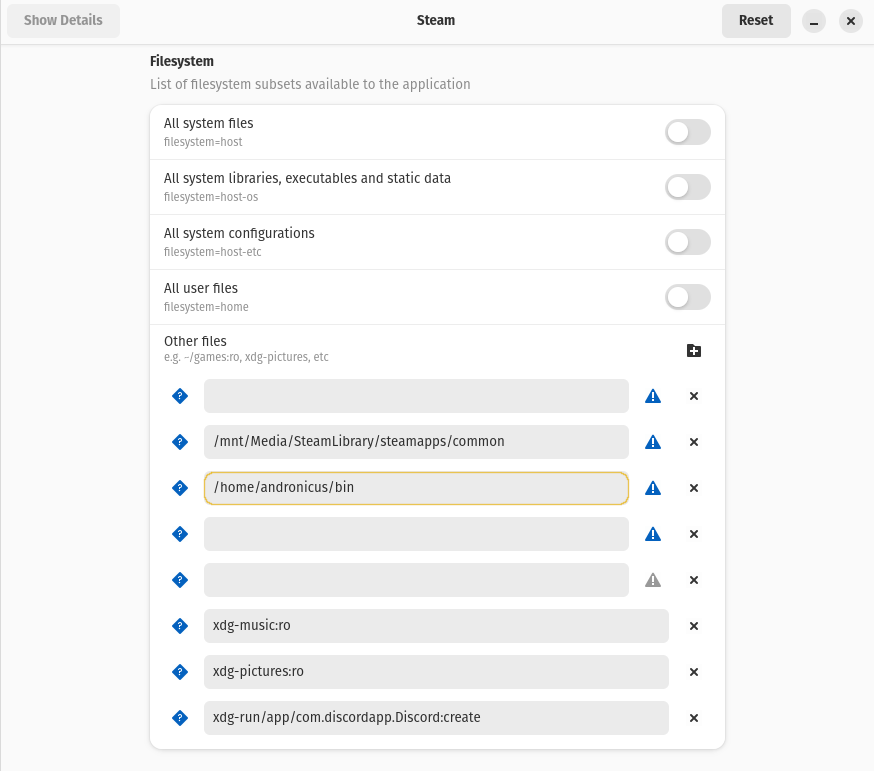
Create a simple copy script in your folder that you now have permissions in: Mine is called reset-diver that copies the user_settings.config file to Steam’s Helldivers 2 folder
nano reset-diverthis is what is copied into the text editor
#!/bin/bash
cp /home/andronicus/bin/user_settings.config /home/andronicus/.var/app/com.valvesoftware.Steam/.local/share/Steam/steamapps/compatdata/553850/pfx/drive_c/users/steamuser/AppData/Roaming/Arrowhead/Helldivers2/
then make sure its executable
chmod +x reset-diverIn steams launcher option for Helldivers I have it set: “<location of reset diver script> ; %command%”
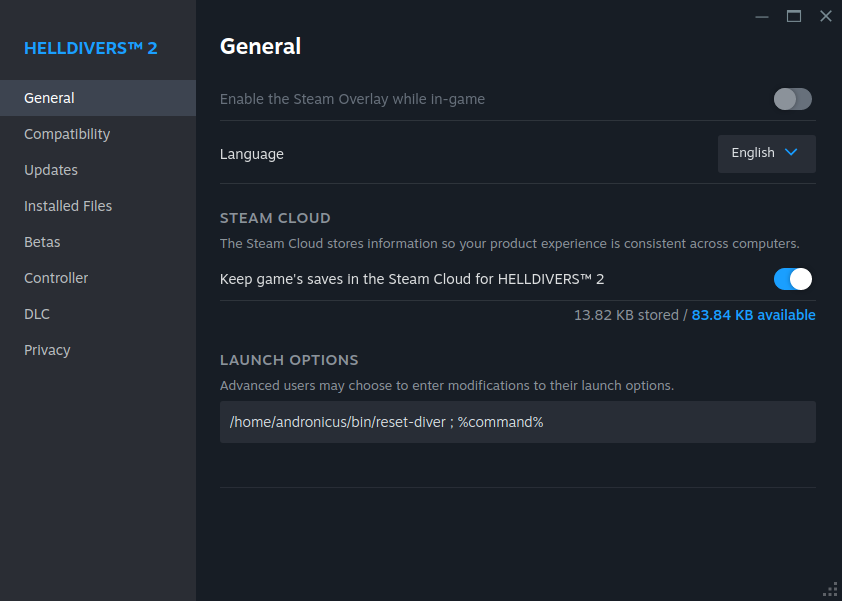
Also, create a script to copy destination file into personal directory: this is if you make changes in game and want to save
I created a copy script called copyhelldivers. You will need to replace <user> with your username
nano copyhelldivers#!/bin/bash cp /home/<user>/.var/app/com.valvesoftware.Steam/.local/share/Steam/steamapps/compatdata/553850/pfx/drive_c/users/steamuser/AppData/Roaming/Arrowhead/Helldivers2/user_settings.config /home/<user>/bin/ sed -i '/borderless_fullscreen/c\borderless_fullscreen = true' /home/<user>/bin/user_settings.configchmod +x copyhelldivers